Crediting people and communities
Acknowledge who contributed to a work, describe what they did, and keep their names and credits accurate.
Archive material can bring together the contributions of people, families, communities and organizations. Recording those contributions helps others understand who was involved and what they did.
In a record’s working draft, use Contributors to add and update these credits. Record what is known; you can leave this section empty when contributions are unknown.
How the Directory connects information
The Directory stores names and descriptive information for people, families, communities and organizations. Each has a Directory entry that can be selected wherever it is needed.
The Directory is managed separately from individual records. Its entries can be used for contributor credits, acquisition sources, rights holders, cultural authorities or stewards, and transcript attribution.
Selecting an entry under Contributors connects that person or group to a particular work. Their name comes from the Directory; their roles and creator credit belong to that record. The same person may have different roles on different records.
A Directory entry does not create a sign-in account or give anyone access to the application.
Roles and creator credit
A role describes what someone did, such as interviewing, photographing, translating or transcribing. You can select several roles for the same contributor.
Credit as a creator identifies someone who created the original work. This is a separate choice: selecting a role such as “author” or “photographer” does not automatically select creator credit.
Each contributor needs at least one role, creator credit, or both. You can credit someone as a creator without selecting a role.
Use the information available about the work and follow the relevant community's practices for acknowledging contributions. A creator credit does not by itself establish rights ownership or permission to share the material.
Add a contributor
Start in an editable draft. You cannot edit the draft while the record is in review.
Adding contributors requires permission to edit the draft and look up Directory entries. Creating a new entry requires an additional permission.
Ask someone who manages access to help if the required controls are unavailable. With permission to edit the draft, you can still change roles or creator credit, or remove existing credits, without Directory lookup access.
- Find Contributors and choose Add contributor at the bottom of the section. A new contributor panel opens.
- Under Person or group, search the Directory for the person, family, community or organization. Check the entry's kind and description, especially when several entries have the same name, then select the matching entry.
- Choose one or more Roles, select Credit as a creator, or do both.
The credit saves automatically once you have selected a Directory entry and at least one role or creator credit. There is no separate save button for the contributor. Check the draft's save status before leaving.
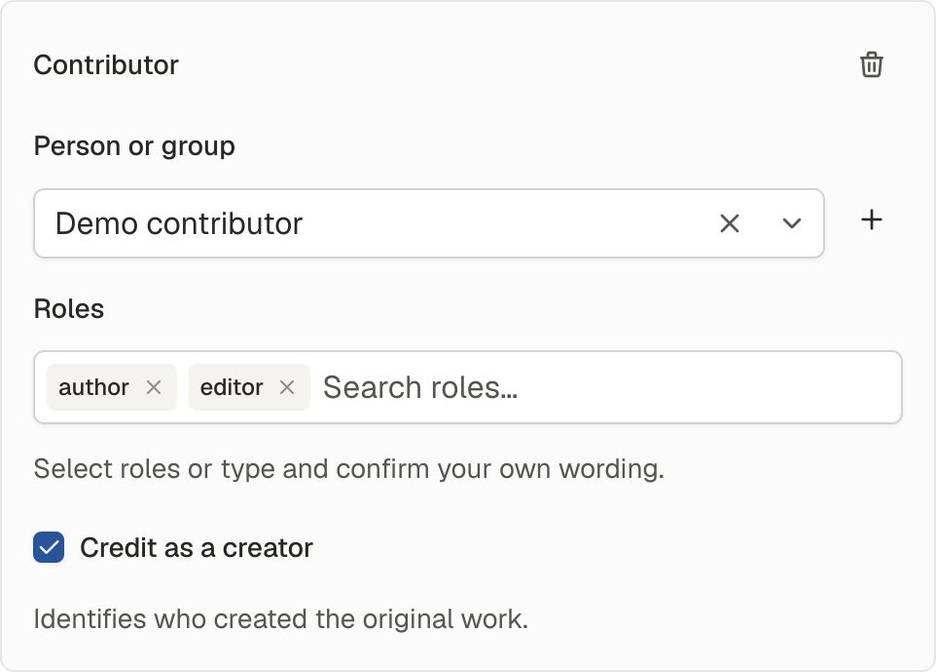
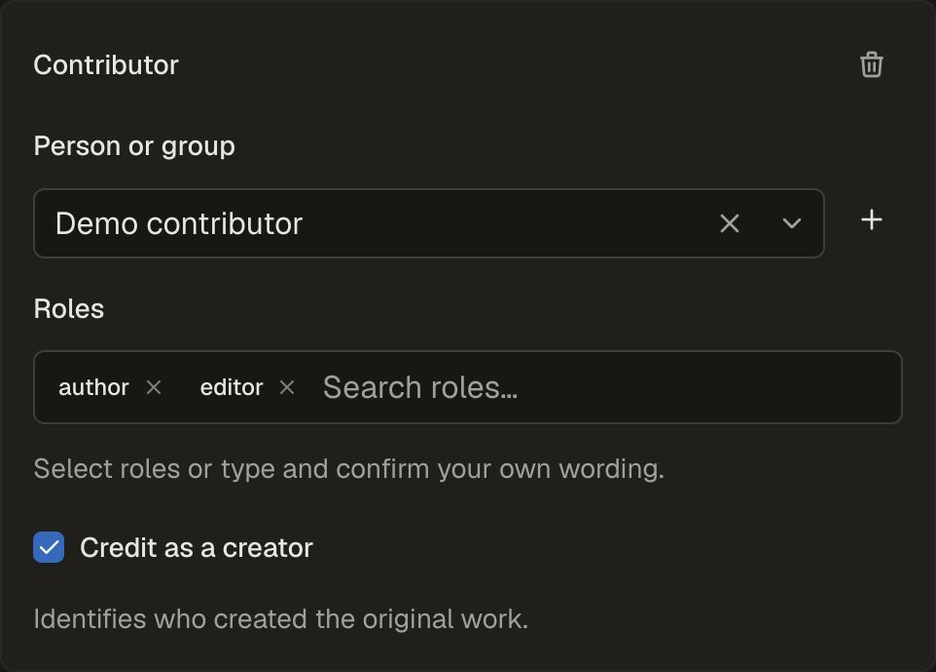
A completed credit using demonstration data. Creator credit is a separate choice from the author and editor roles.
Choose Add contributor again to add another person or group. A record supports up to 50 contributors.
Search by name or alias before creating an entry. An alias is another name the person or group may be known by. Reusing the same entry keeps their information connected across records.
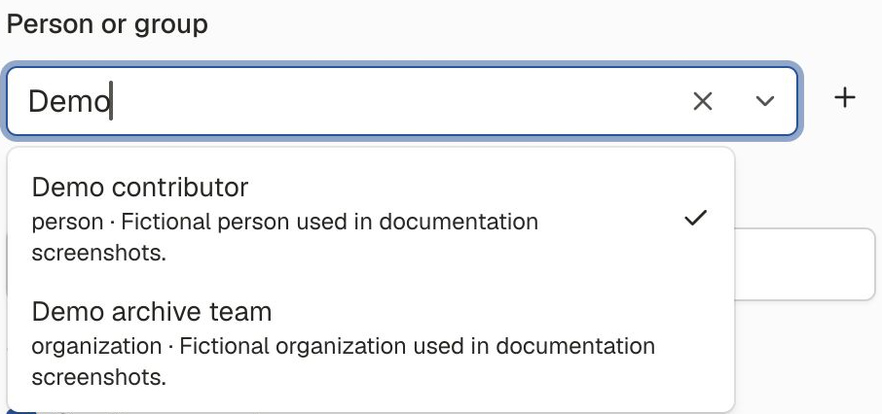
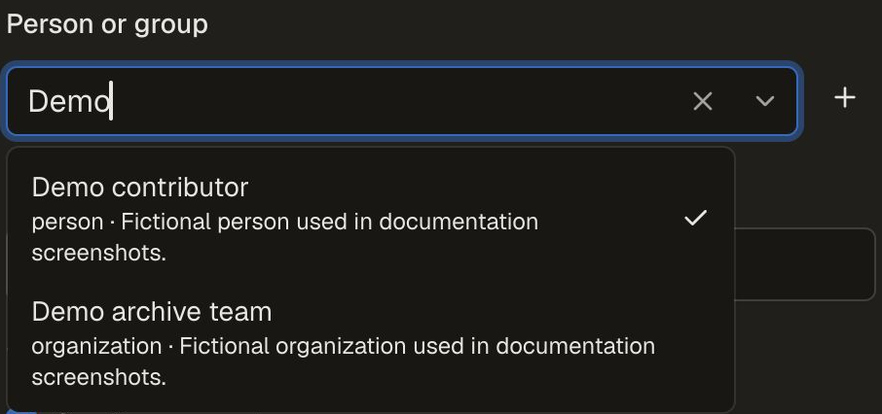
Demonstration Directory entries. Check the kind and description before choosing a result.
If the contributor is already listed on this record, edit their existing credit to add another role.
If there is no matching Directory entry
If you have permission to create entries, choose Add entry beside the Directory search. Enter the details, then choose Create and use. Continue by selecting roles or choosing Credit as a creator in the contributor panel.
Two different people or groups may have the same name. If the application finds an existing entry, check whether it represents the intended contributor. Choose Create distinct entry only when it represents someone different.
Creating the Directory entry and saving the contributor credit are separate steps. If you remove an unfinished contributor panel, or saving its credit fails, the new Directory entry remains. Search for it before creating another.
Change a contributor's credit
Each contributor panel keeps Person or group, Roles and Credit as a creator available for editing. Complete changes save automatically.
Use Roles to select every role that applies—for example, someone may be both interviewer and recorder. Selected roles appear as small labels inside the field. Use the remove button beside a role to remove it.
If the suggested roles do not fit, type your wording in Search roles, then choose Use “…” or press Enter. Typing alone does not add the role.
Your wording is saved with this contributor's credit on this record. It does not become a shared suggestion on other records.
Each contributor can have up to 10 roles, with up to 80 characters per role.
You can change Credit as a creator separately from the roles. A credit must retain at least one role or creator credit. See If a credit does not save for help with unfinished changes.
If you selected the wrong person or group and have Directory lookup access, use Person or group to choose the correct Directory entry. This changes the credit on this record. To correct the name or description of the same person or group, update their Directory entry instead, as explained below.
Remove a credit and understand the list order
Use the trash button at the top of the contributor panel, labelled Remove contributor, to remove that credit. It also removes an unfinished panel you no longer need. The Directory entry remains available elsewhere.
New contributor panels appear at the end of the list. Existing credits keep their order; the form does not currently offer controls to rearrange them.
Automatically generated citations list contributors marked as creators, in credit order. Selecting a role alone does not include someone in that list. If the record has a manually entered Preferred citation, changing contributor credits does not update that wording.
If a credit does not save
An empty contributor panel does not save a credit. Select a person or group and at least one role or creator credit, or use Remove contributor to remove the unfinished panel.
If an edit leaves an existing credit incomplete, its last complete details stay saved until you finish the change or remove the credit. If a change would leave neither a role nor creator credit, select a role or creator credit, remove the contributor, or keep the current credit. Complete changes to other contributors can still save while that edit is unfinished.
If you have typed role wording, confirm it with Use “…” or choose Clear wording. Closing the suggestions or pressing Escape does not confirm or clear what you typed.
Complete or remove unfinished contributor panels before submitting or discarding the draft. Close any Directory entry creation sheet when you are finished.
Check the draft's save status before leaving. If saving fails, follow the draft's recovery instructions.
Correct a name or other Directory details
To correct a name, alias or description, open Directory under Catalog. You need permission to update Directory entries.
Correct the entry when it still describes the same person, family, community or organization. Do not change an existing entry to represent someone else.
Because the entry is shared, a correction can affect several records:
| Where the entry is used | What happens after a correction |
|---|---|
| Current drafts and published records | They show the updated Directory details. |
| Records already submitted for review | They keep the details saved when they were submitted. |
| Retained record history | Earlier versions keep their saved details. |
A later submission saves the Directory details available at that time.
Correcting a Directory entry does not change the contributor's roles, creator credit or credit order. It also does not send each linked record through review.
Names, aliases and descriptions may appear alongside records, including public records. Use wording appropriate for that visibility, taking account of naming preferences and community guidance. Do not enter confidential contact details.
Retire an entry
Retire makes an entry unavailable for new selections. It does not remove existing credits, including credits carried into a new draft. Those credits can still be edited or removed.
Someone with the required permission can choose Reactivate to make the entry selectable again. The Directory currently has no merge or delete option.
Related reading
- Understanding archive records explains how credits and other information connect to a record.
- How records change explains working drafts, review and saved history.
- Community decisions and responsibilities discusses community authority and responsibilities around archive material.